ORZENO — Global multi-asset marketplace Markets open 24 / 7

The connected trading ecosystem

Your markets. Your strategies. Your control.

Copy trading, intelligent automation and spot execution — held inside one deliberately transparent, multi-asset platform built for people who intend to understand what they own.

  • Multi-asset by design
  • User-controlled automation
  • Evidence-first positioning
ORZENO / Forex Pro Live prices
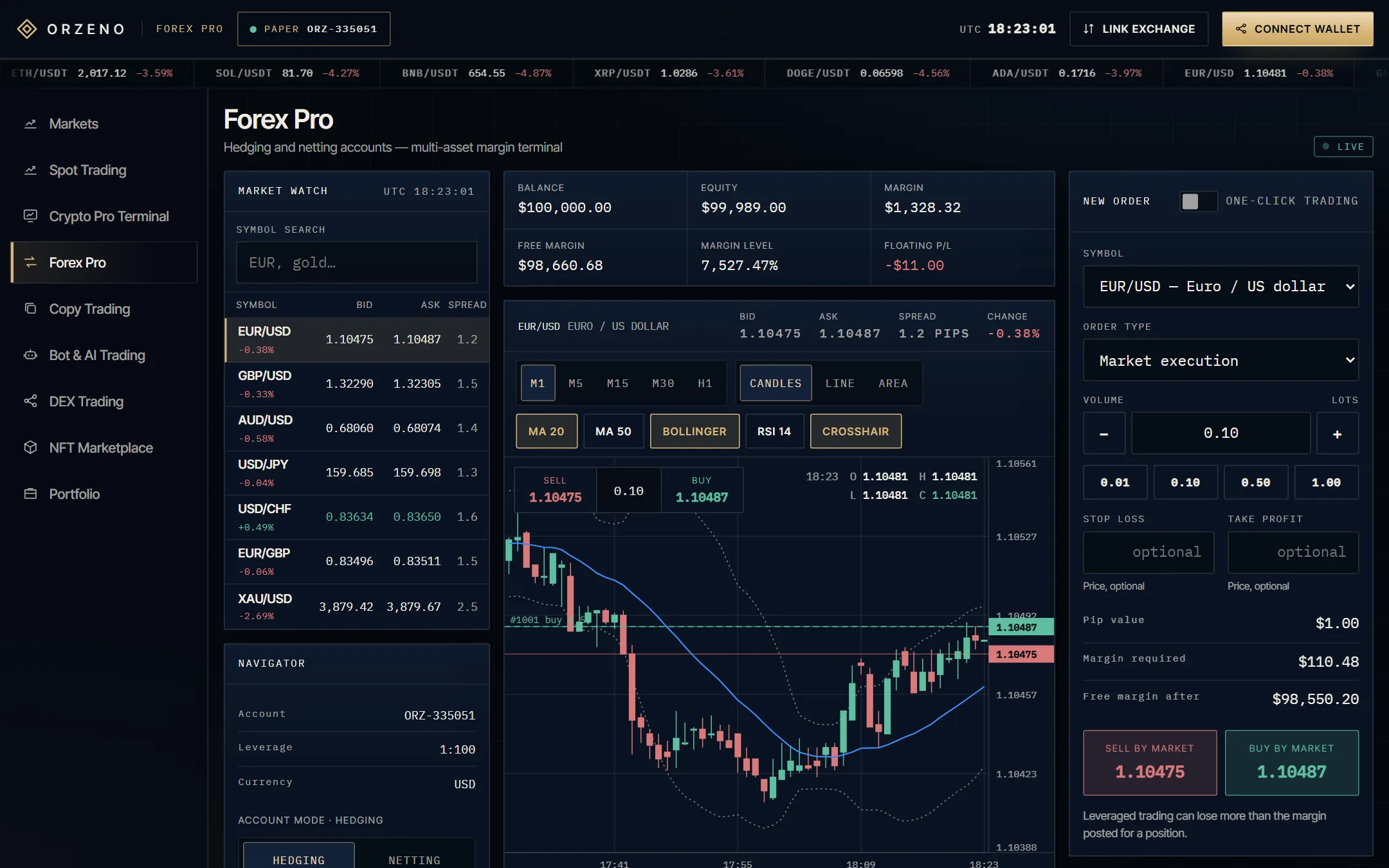
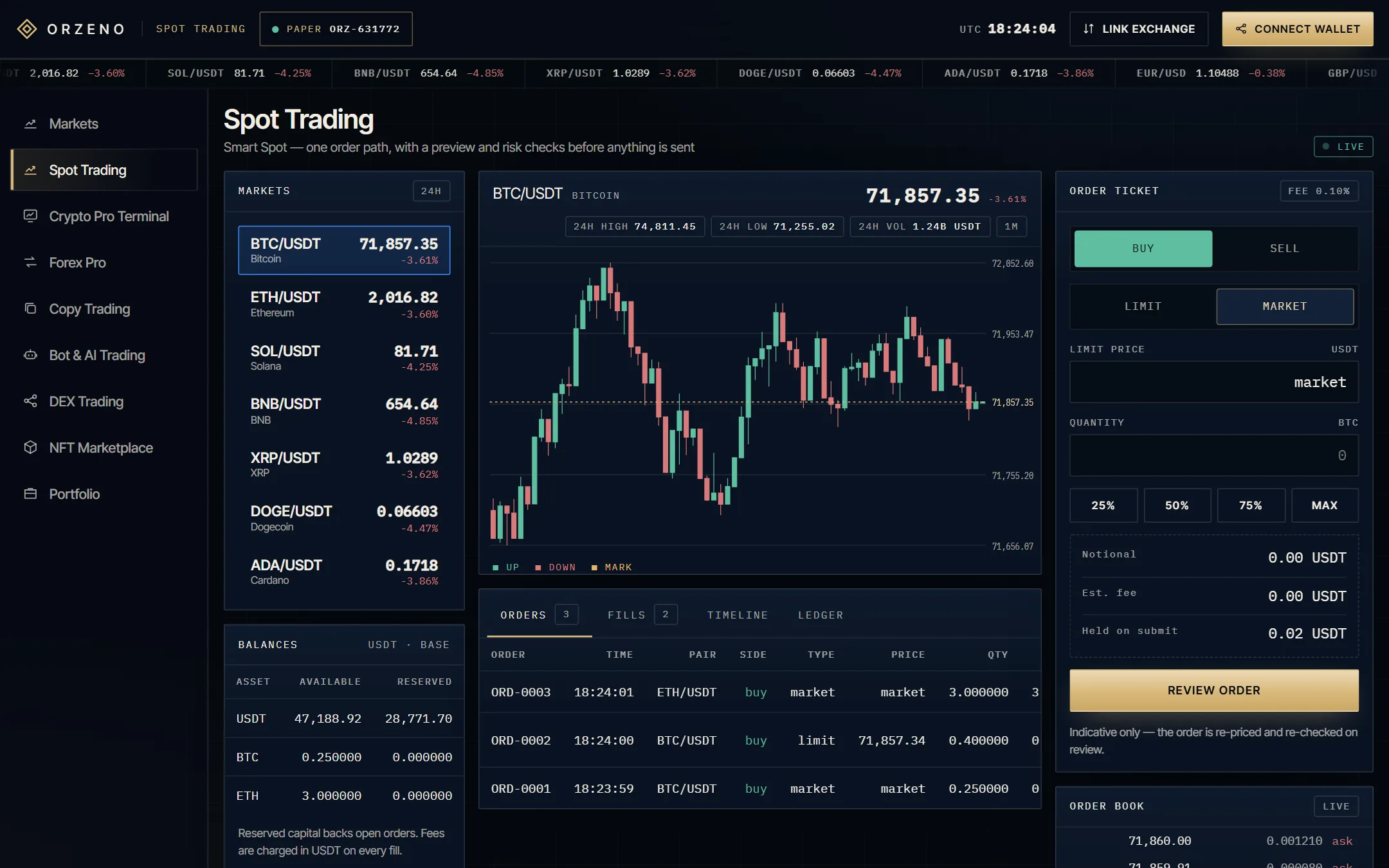
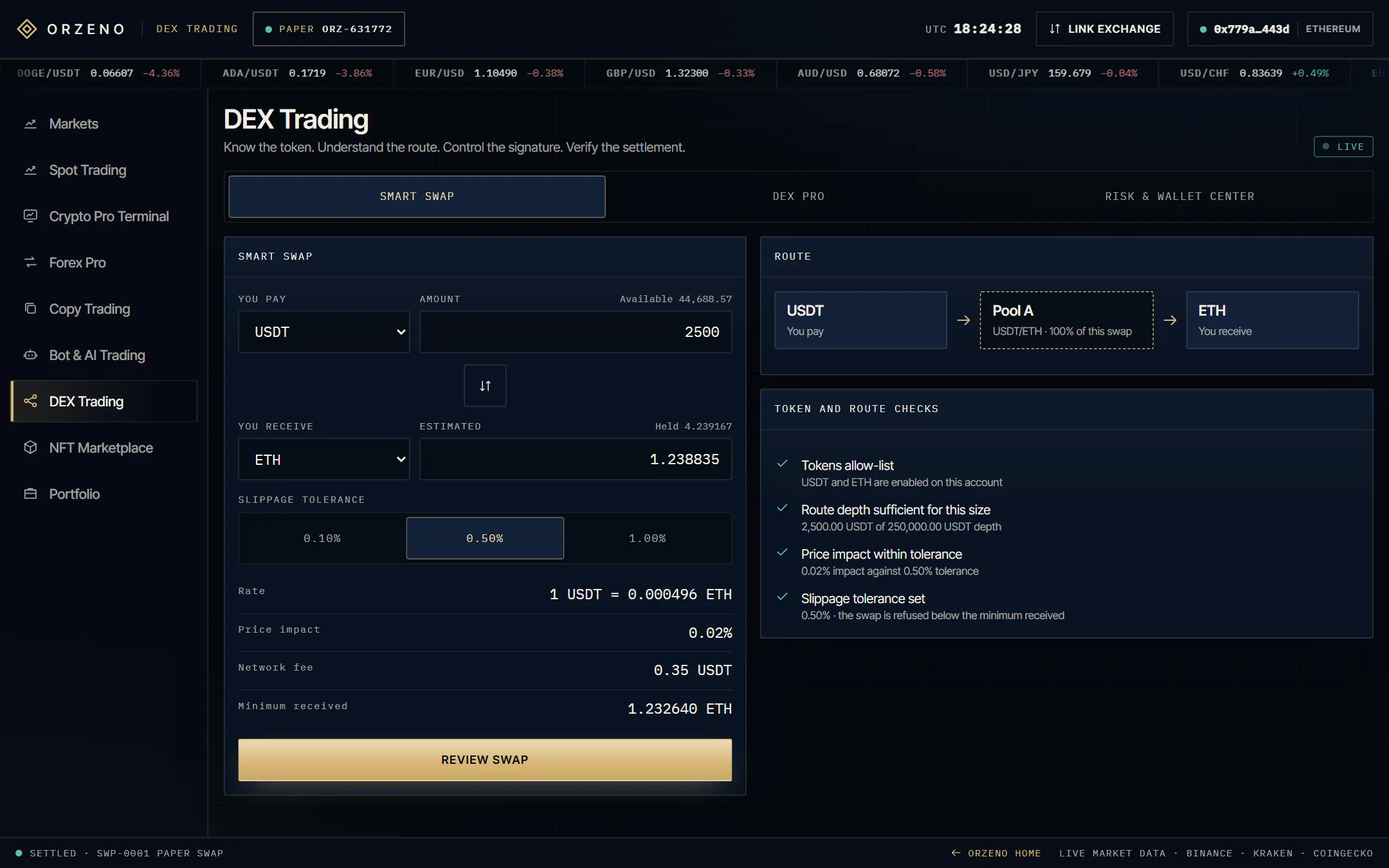
Forex Pro in the ORZENO terminal: Market Watch, candle chart, order ticket and positions. Spot Trading in the ORZENO terminal: instruments, chart, order book and order ticket. DEX Trading in the ORZENO terminal: Smart Swap with its route and checks.
Open Forex Pro
Eight screens · one account

IISeven products

Three experiences. One standard of care.

Copy Trading, Bot & AI Trading and Spot Trading lead the platform. Each is designed to be understood before it is used — and to make its own limits legible. See every screen

01Copy Trading

Follow with judgment.

Explore strategies through transparent context rather than promises. Approach, risk language and product boundaries are stated before any decision is made.

  • Strategy discovery
  • Risk context up front
  • Your capital, your call
Open in terminal

02Bot & AI Trading

Automate with intent.

Rule-based automation with visible logic. Every bot states what it does, where it stops and what it cannot promise — before it is switched on.

  • Rule-based strategies
  • Visible logic
  • Stop and review anytime
Open in terminal

03Spot Trading

Execute with clarity.

A focused spot experience: legible order flow, plain-language risk and an interface that does not reward haste or hide its own mechanics.

  • Clear order flow
  • Plain-language risk
  • No dark patterns
Open in terminal

04 · Connected

Forex Pro

Currency markets, within the same platform vocabulary.

Open in terminal

05 · Connected

Crypto Pro Terminal

Professional charting and market structure in one workspace.

Open in terminal

06 · Connected

DEX Trading

Designed for on-chain exchange, reached from the same index.

Open in terminal

07 · Connected

NFT Marketplace

Digital collectibles, held alongside the trading stack.

Open in terminal

Three flagships · four connected products · one accountFig. 02

IIIInside the terminal

Look inside, before you commit.

Eight screens share one account, one vocabulary for risk and one review step before anything is sent. Pick a screen, then open it and use it yourself. Launch the terminal

ORZENO / Copy Trading01 / 08
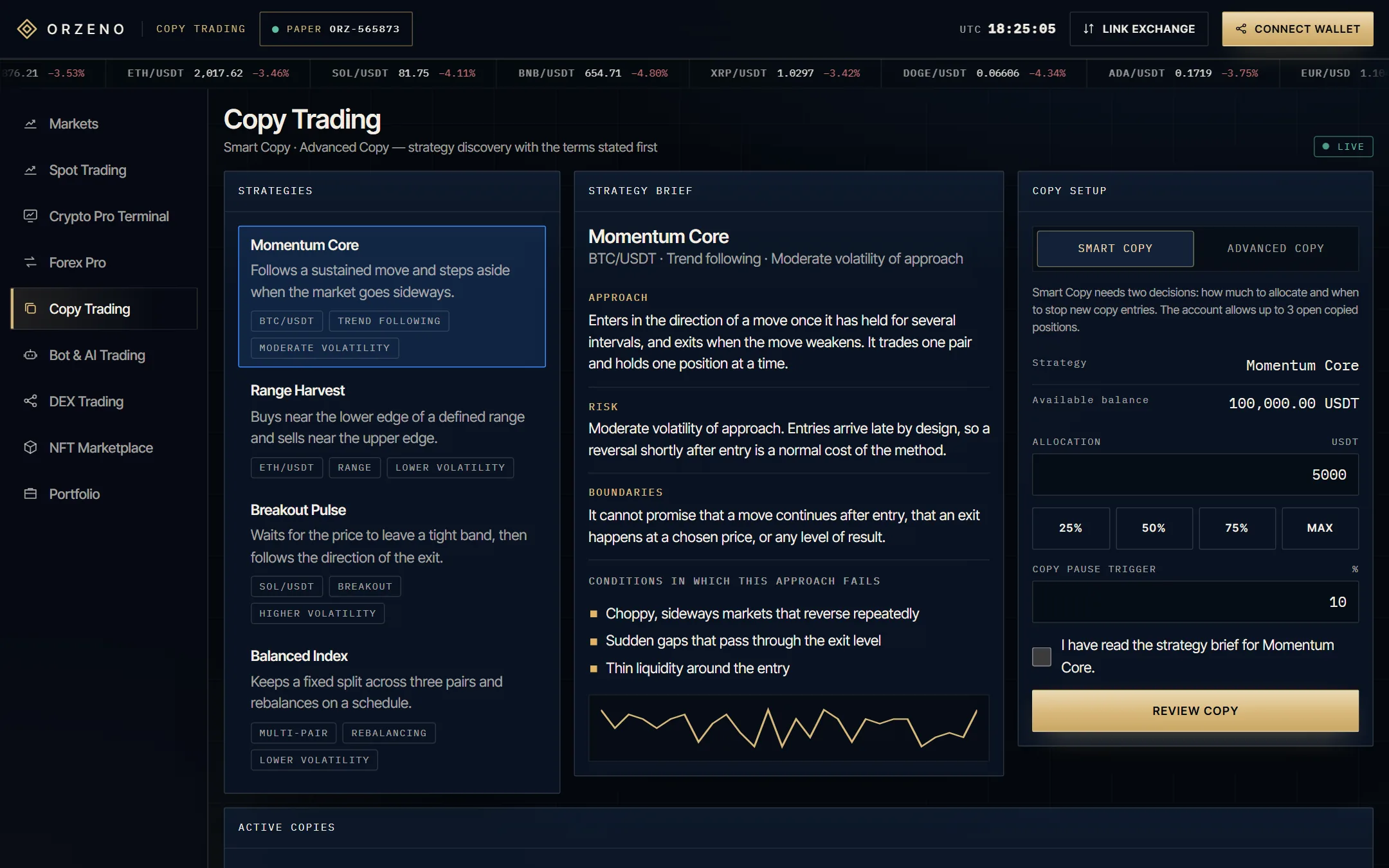
Copy Trading screen: strategy briefs with approach, risk language and boundaries, and the copy setup.

01Copy Trading

Read the brief, then decide.

Each strategy opens with its approach, its risk language and its boundaries. Copying is a reading exercise first, and a position second.

  • Smart Copy and Advanced Copy
  • Your allocation and stop trigger
  • Review sheet with the copy disclosure
  • Pause or stop any copy
Open this screen
ORZENO / Bot & AI Trading02 / 08
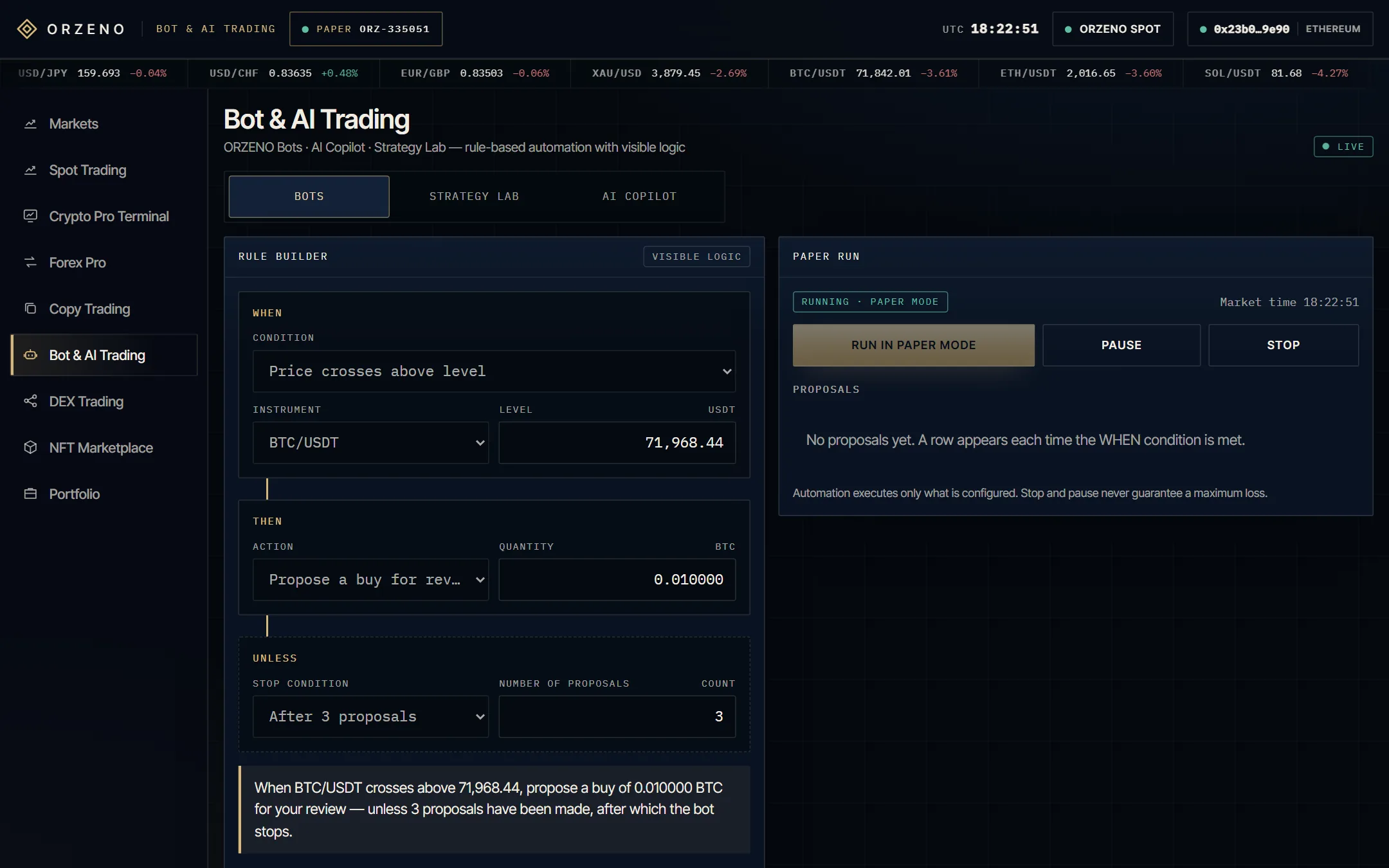
Bot and AI Trading screen: the When, Then, Unless rule builder and a paper-mode run.

02Bot & AI Trading

Read the logic before it runs.

Automation is written in plain rules: what triggers it, what it does, and what stops it. The interface shows the logic, not only the outcome.

  • When · Then · Unless rule builder
  • Paper mode with proposals to approve
  • Strategy Lab replay
  • AI Copilot notes — analysis only
Open this screen
ORZENO / Spot Trading03 / 08
Spot Trading screen: instruments, candle chart, order book and order ticket.

03Spot Trading

One order path. No theatre.

A focused execution surface: the market, the order, and a plain summary of what is about to happen. No false urgency, no noise.

  • Candle chart and order book
  • Limit and market orders
  • Review step with risk checks
  • Orders, fills and ledger
Open this screen
ORZENO / Forex Pro04 / 08
Forex Pro screen: Market Watch, chart with timeframes, order ticket and positions.

04Forex Pro

A margin terminal, in the same vocabulary.

A multi-panel margin terminal with hedging and netting accounts: watchlist, chart, ticket and blotter on one screen.

  • Market Watch with bid, ask and spread
  • Stop loss, take profit and pending orders
  • Balance, equity and free margin in view
  • Positions, history and journal
Open this screen
ORZENO / Crypto Pro Terminal05 / 08
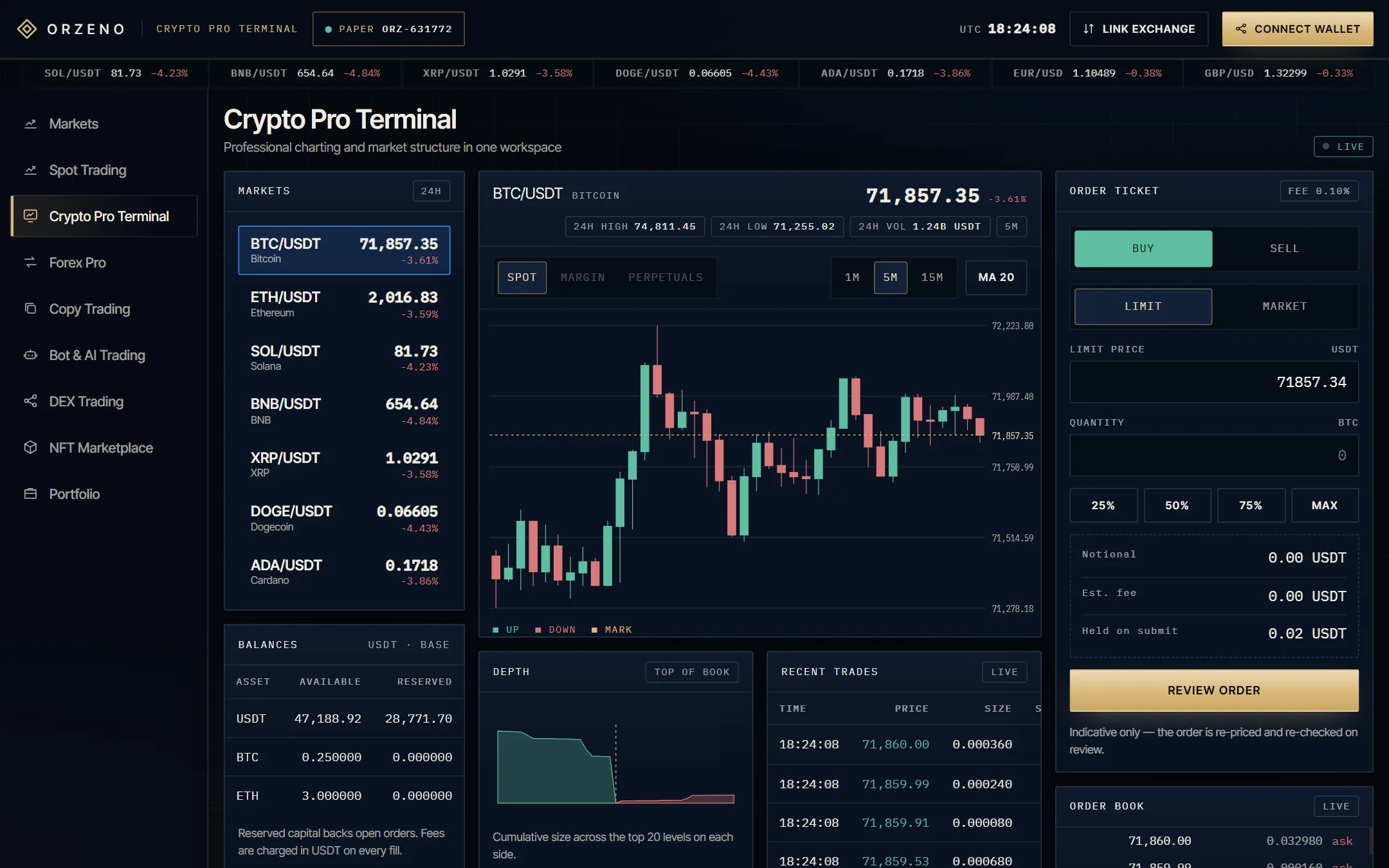
Crypto Pro Terminal screen: chart with timeframes and moving average, depth view and recent trades.

05Crypto Pro Terminal

Market structure in one workspace.

Professional charting and market structure beside the order ticket, for people who want the whole picture at once.

  • Timeframes and moving average
  • Depth view
  • Recent trades
  • The same review step as Spot
Open this screen
ORZENO / DEX Trading06 / 08
DEX Trading screen: Smart Swap with its route, checks and signature steps.

06DEX Trading

See the route before you sign.

On-chain exchange, reached from the same index. The swap shows its route and its checks before a signature is asked for.

  • Smart Swap with route and checks
  • Signature walkthrough, step by step
  • DEX Pro view
  • Risk & Wallet Center
Open this screen
ORZENO / NFT Marketplace07 / 08
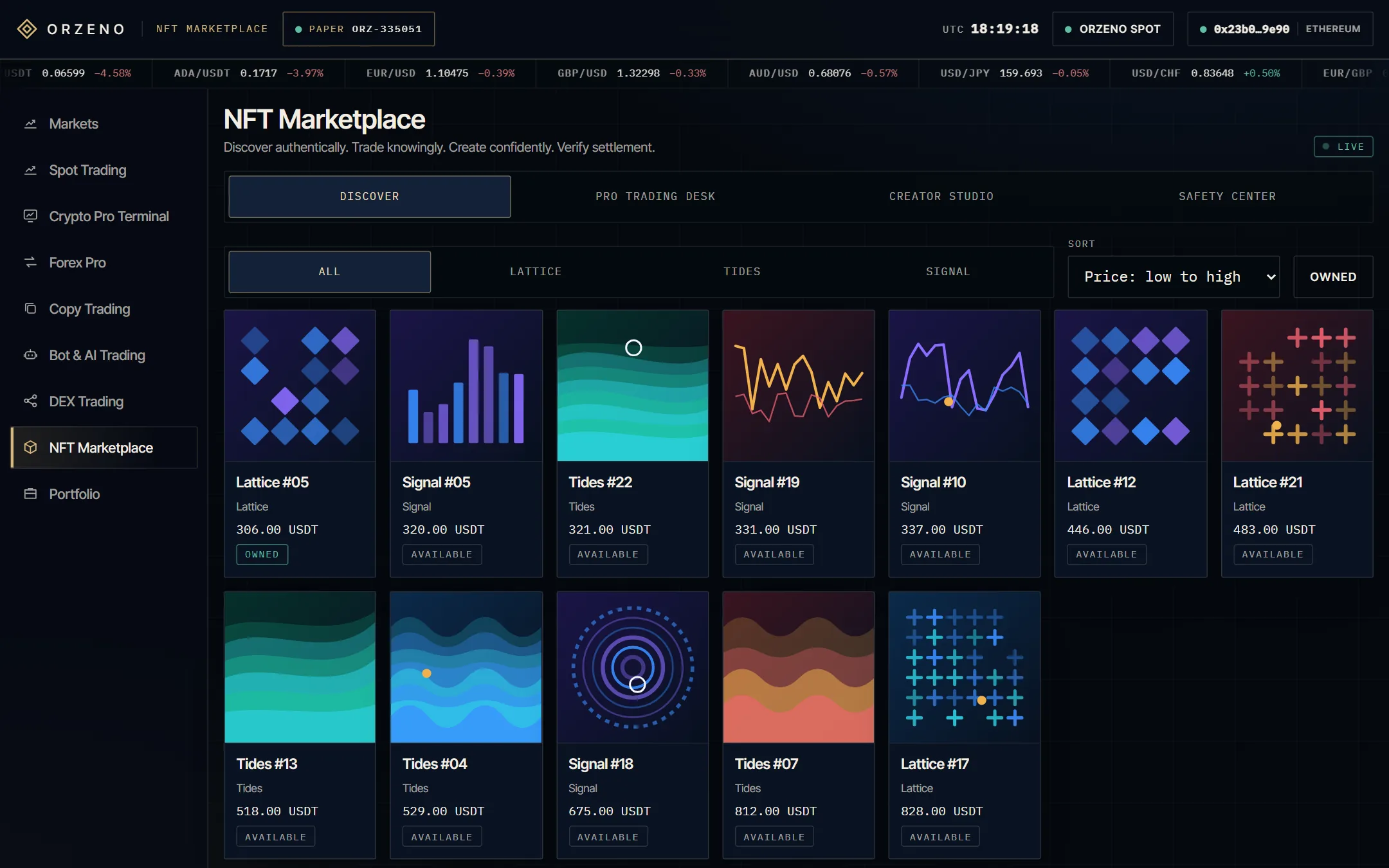
NFT Marketplace screen: the Discover grid of collectibles with the trading desk and safety tools.

07NFT Marketplace

Collectibles, beside the trading stack.

Digital collectibles held alongside everything else, with the same habit of stating terms before a decision.

  • Discover grid
  • Pro Trading Desk
  • Creator Studio
  • Safety Center
Open this screen
ORZENO / Portfolio08 / 08
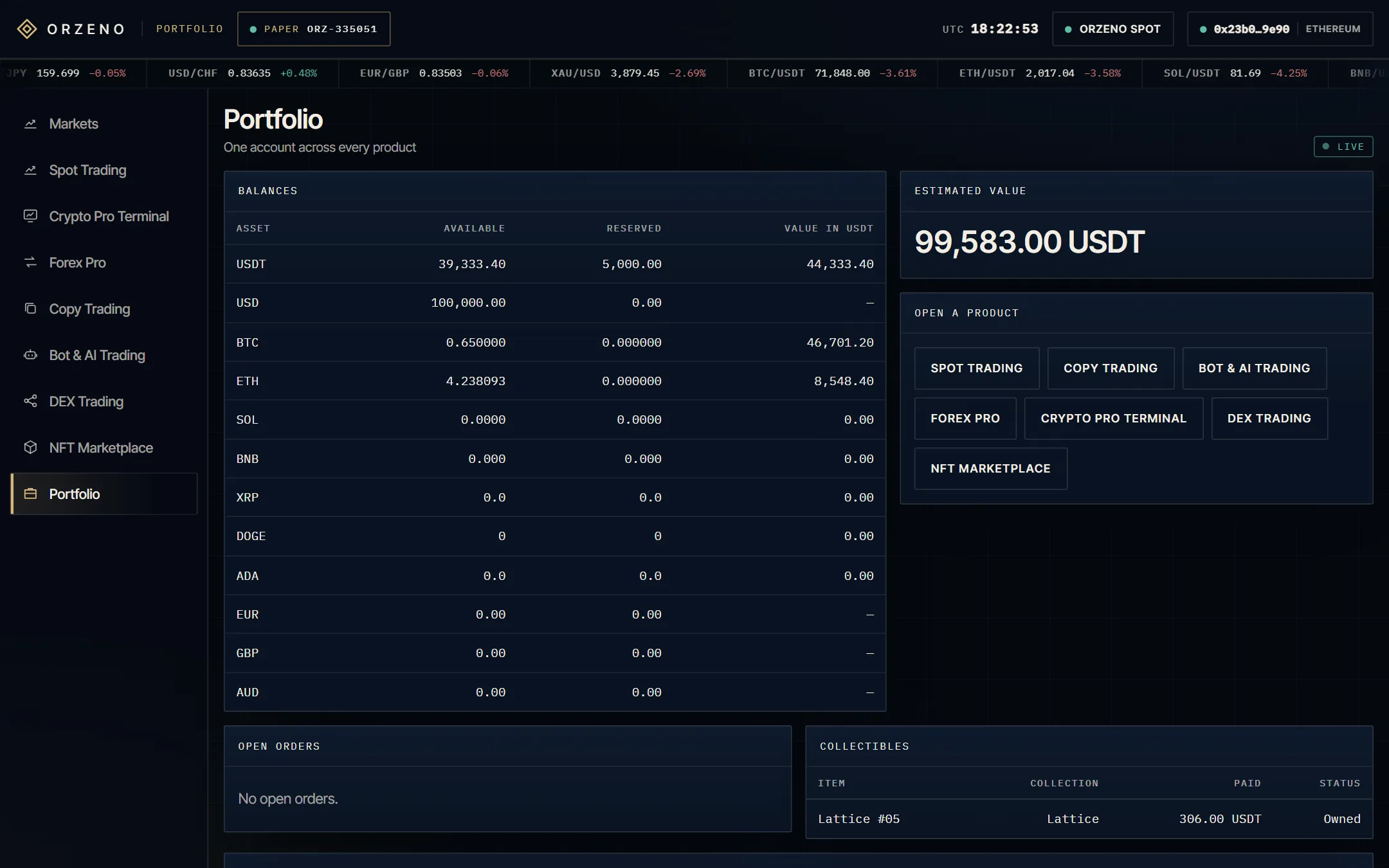
Portfolio screen: balances, estimated value, open orders, collectibles and activity.

08Portfolio

One account across every product.

What you hold, what is reserved and what happened — in one place, so a decision made on one screen is legible on another.

  • Balances and estimated value
  • Open orders
  • Collectibles
  • Activity log
Open this screen

Use arrow keys to move between screens

IVForex Pro

A full desk, on one screen.

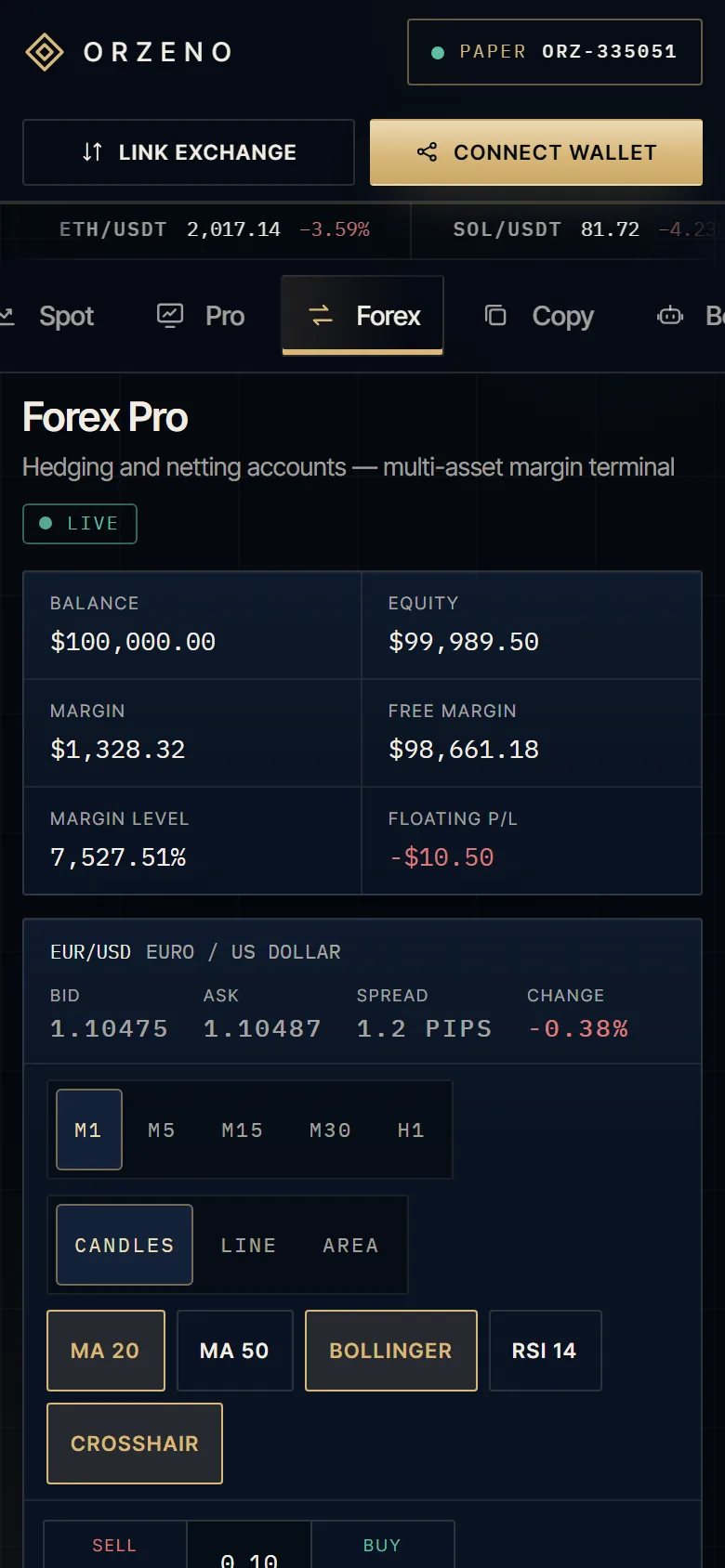
Forex Pro is a multi-panel margin terminal with hedging and netting accounts. Watchlist on the left, chart and blotter in the centre, ticket on the right — and the account state always in view.

Market Watch
Bid, ask and spread for every symbol. Selection drives the chart and the ticket.
Chart
Timeframes and indicators on one large canvas.
Order ticket
Side, volume, stop loss and take profit, with margin shown before the review step.
Market & pending
Trade at the quote, or rest a limit or stop order until it triggers.
Hedging & netting
Separate positions per deal, or one net position per symbol. The terminal says which mode is active.
Blotter
Order, deal, position — three views of the same history, not a flat trade list.
One-click trading
An explicit toggle. It is off until you switch it on.
Review first
Every order passes a review step that states what is about to happen.
Open Forex Pro
ORZENO / Forex ProDesktop
Forex Pro on desktop: Market Watch, chart, order ticket and the positions blotter in one workspace.
Forex Pro on a phone: equity and free margin first, chart, then the order ticket.

VConnect

Your wallet. Your exchange. Your permissions.

Connection is a decision, so the terminal treats it like one: it states what is being asked for, what is never asked for, and how to undo it.

ORZENO / Connect a wallet
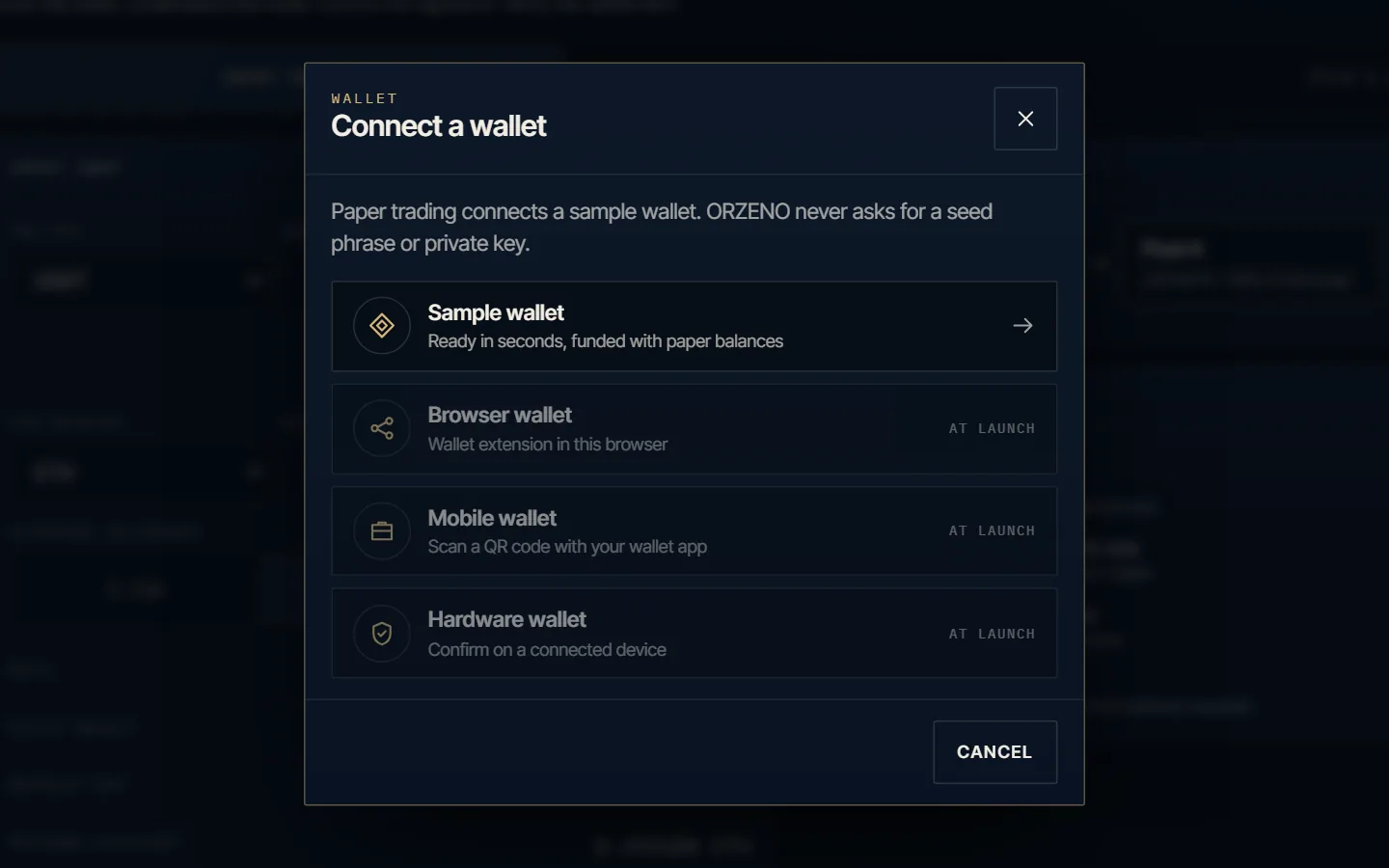
The Connect a wallet sheet in the ORZENO terminal: a sample wallet, with browser, mobile and hardware wallets listed for launch.

ADEX Trading · NFT Marketplace

Connect a wallet

On-chain screens ask for a wallet before they act. Paper trading connects a sample wallet in seconds, and you can switch network from the same sheet. Browser, mobile and hardware wallets follow at launch.

  • Sample wallet, ready in seconds
  • Network switch in the same sheet
  • Never a seed phrase or private key
  1. Step 01Create the sample wallet
  2. Step 02Fund it with paper balances
  3. Step 03Link it to your account
Open DEX Trading
ORZENO / Link an exchange
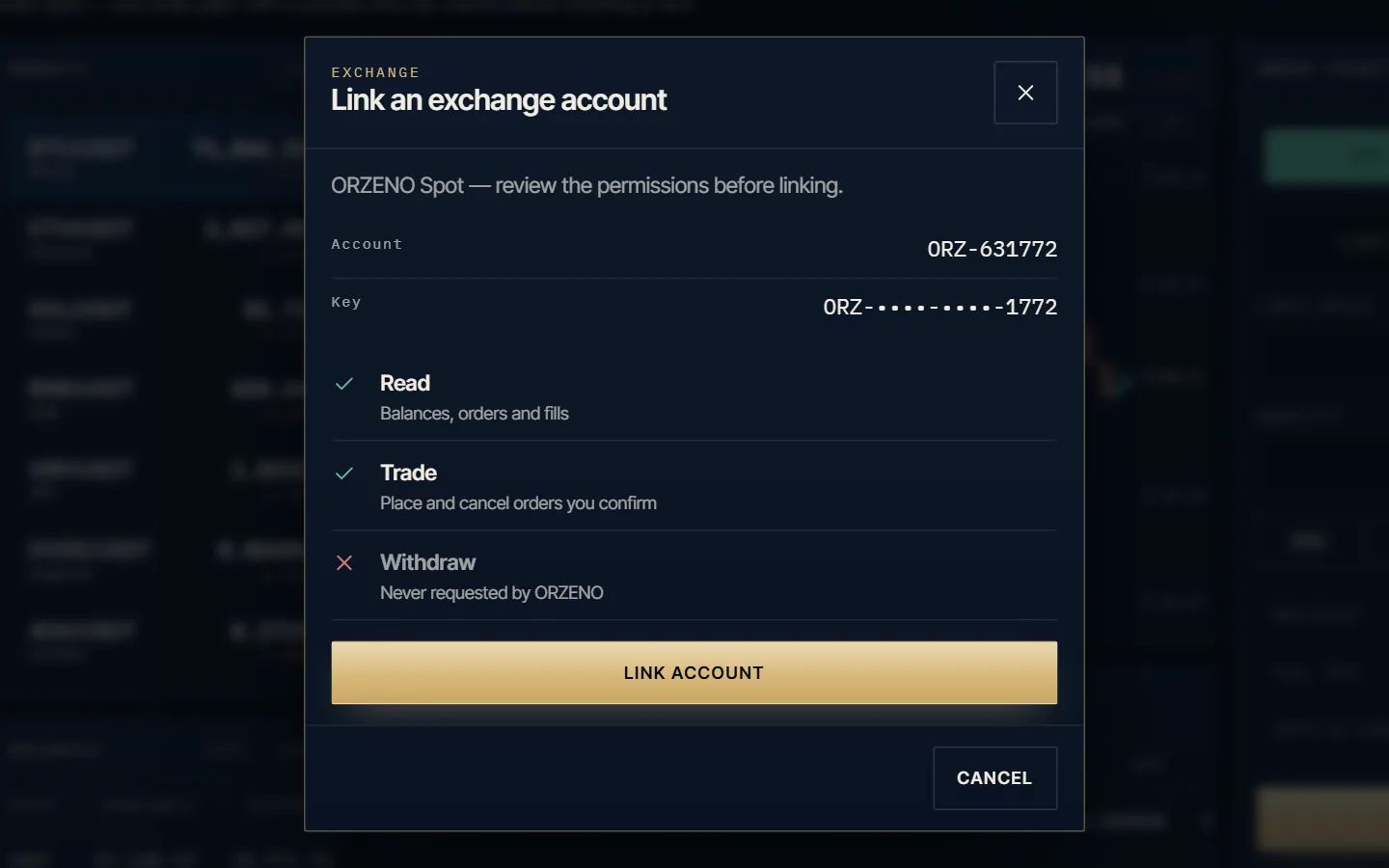
The Link an exchange account sheet in the ORZENO terminal, showing read and trade permissions with withdrawals not permitted.

BSpot · Forex Pro · Copy · Bot & AI

Link an exchange account

Link a trading venue with read and trade permissions. Withdrawals are never requested, and copy, bot and AI features never receive withdrawal authority.

  • Read — balances, orders and fills
  • Trade — orders you confirm
  • Withdraw — never requested
  1. Step 01Choose the venue
  2. Step 02Review the permissions
  3. Step 03Link, then unlink whenever you choose
Open the terminal

VIWhy ORZENO

Built to be understood before it is used.

Most platforms compete on what they add. ORZENO competes on what it makes legible: the terms, the limits and the seams between products.

  • 01

    Transparency as a feature

    Every screen states what it is, what it is not, and what it cannot promise. Disclosure is part of the interface, not a page appended to it.

  • 02

    Control stays with you

    Automation is configured, reviewed and stopped by the person accountable for it. Nothing is pre-selected on your behalf.

  • 03

    One system, not seven silos

    Copy, automation and execution share one vocabulary for risk, limits and control — so a decision in one place is legible in another.

  • 04

    Restraint as a standard

    No invented numbers, no urgency mechanics, no implied guarantees. Where evidence does not exist yet, the page says so.

VIIHow it works

From interest to intent, in four movements.

The order in which a considered decision is meant to happen — on every screen of the terminal.

  1. 01 · Explore the screen

    Discover

    Begin with the three flagship experiences. Each opens with what it does and who it is built for, before anything is configured.

  2. 02 · Read the terms

    Understand

    Approach, limits and risk language are stated on the screen. If a term is unclear, the product is not ready to be used.

  3. 03 · Set it with intent

    Configure

    Define what runs, under which conditions, and where it stops. Configuration is explicit and reversible.

  4. 04 · Keep the review

    Review

    Nothing is permanent. Automated steps can be paused, inspected and stopped — and the record stays legible afterwards.

VIIITraders & creators

Two sides of one marketplace.

A marketplace is only as good as the honesty of its listings. ORZENO is designed around clarity on both sides of the relationship.

iFor traders

Judgment, not momentum.

The interface is built to slow a decision down to the point where it can be understood — then get out of the way.

  • Compare approaches on stated terms, not on claims.
  • See the boundaries of a strategy before you follow it.
  • Keep the final decision, and the ability to reverse it.

iiFor creators

Publish the method, not the myth.

A creator's value should come from legible thinking — approach, conditions and limits — rather than from a headline number.

  • Describe the approach in language a newcomer can follow.
  • State the conditions in which the approach fails.
  • Build an audience on clarity rather than on return claims.

There are no trader profiles, performance histories or testimonials on this page. Creator and strategy listings will be shown when they exist and can be evidenced.

IXQuestions

The questions worth asking first.

Straight answers about what the terminal is, what it is not, and where the boundaries sit.

Launch the terminal
01Are the prices real?

Yes. Prices, charts, order books and market figures come from live public market data and update in real time. Trading runs on a paper account: balances are virtual, no deposit is taken and no order is sent to an exchange.

02What does ORZENO actually offer?

ORZENO is a multi-asset platform built around three flagship experiences — Copy Trading, Bot & AI Trading and Spot Trading — connected to four further products: Forex Pro, Crypto Pro Terminal, DEX Trading and NFT Marketplace. The organising idea is one connected ecosystem rather than seven separate applications.

03Are the screens on this page the terminal itself?

Yes. Every screen shown here was captured from the ORZENO terminal. Open the terminal and you can use each one yourself, with today's prices.

04Do you publish returns or trader performance?

No. This page contains no performance figures, no customer statistics, no trader profiles and no testimonials. Where we cannot evidence a claim, we do not make it.

05How is risk handled in the product design?

Risk language is part of the interface rather than a separate legal page: what an approach does, the conditions it is built for and what it cannot promise are stated at the point of decision. Stop and pause controls are visible and reversible; they do not cap a loss. Trading involves risk, including the possible loss of capital. Nothing on this page is investment advice.

06Do I need an account or a real wallet to try it?

No. The terminal opens straight into a paper account with virtual funds, and wallet connection uses a sample wallet. No wallet extension is contacted, and ORZENO never asks for a seed phrase, private key or password.

07Is ORZENO regulated, and where is it available?

Regulatory status, licensing and availability differ by jurisdiction, and this page does not assert them. Those statements will be published only with supporting detail attached — not as marketing shorthand.

XBegin

Start with the part you can control.

Walk the three flagship screens, read the terms, and see how seven products behave as one platform.